
Cannot Establish a Remote Desktop Connection from SSCM to a Client - Alstud
This lecture is referring to the Section User and Device Collections and the lecture called Using Collections to turn on the Remote Control Feature.
Alstud submitted a question to the message board recently. He wanted to know why he could not access his Windows 10 computer using a remote desktop from Configuration Manager. Later he also mentioned that his network was slow as well. Alstud, came up with a solution that we will discuss shortly.
First, I would check the possible causes as mentioned in the slide.
- Be sure the windows 10 computer is turned on
- You should be able to ping the Windows 10 computer from the SCCM Server.
- The windows firewall is not configured to allow remote control
If you configured the client settings correctly the firewall should have been configured to open the needed ports for the firewall.
- The Remote Control Feature is disabled.
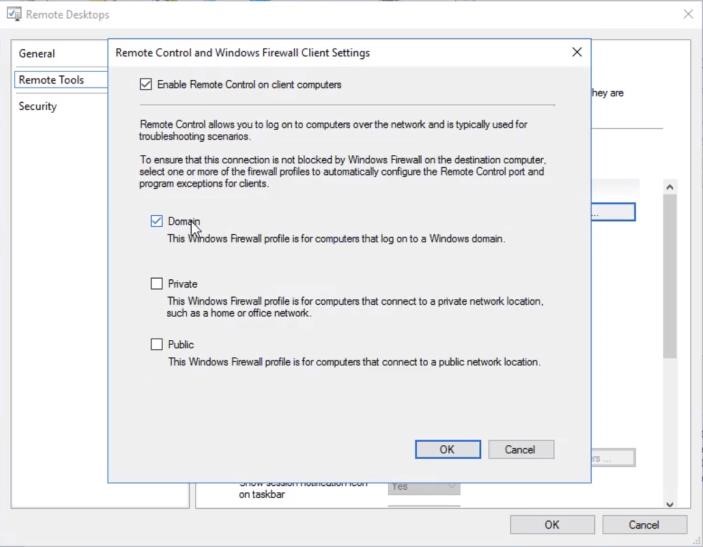
**The Remote Control Feature is disabled. **
By default Windows 10 remote desktop is disabled. That is the purpose of deploying the remote desktop custom client settings.
Alstud found a method to manually force the deployment of the remote desktop custom client settings, from the client computer and not from the SCCM server.
By default, the SCCM server can take an hour to push out the custom client settings.
From the windows 10 computer open control panel, Configuration Manager, click Actions, click Machine Policy Retrieval & Evaluation Cycle, click run now, click ok.
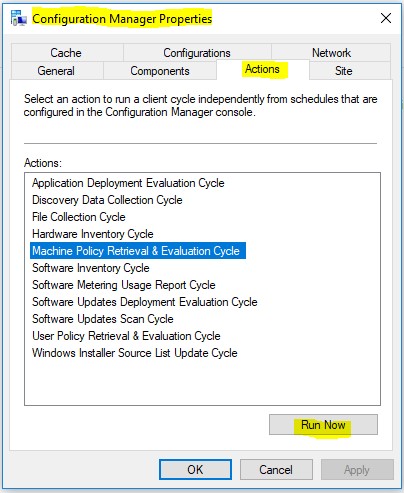
Basically, Alstud forced the remote desktop client settings to run manually on the Windows 10 computer, this enabled the remote desktop feature.
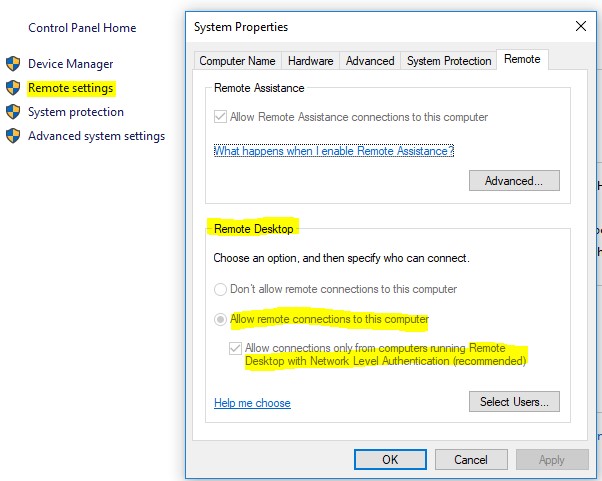
Manual configuration…
No comments yet. Add the first comment to start the discussion.