
The DSC Resource Kit
Let’s open PowerShell and run “Get-DSCResource”
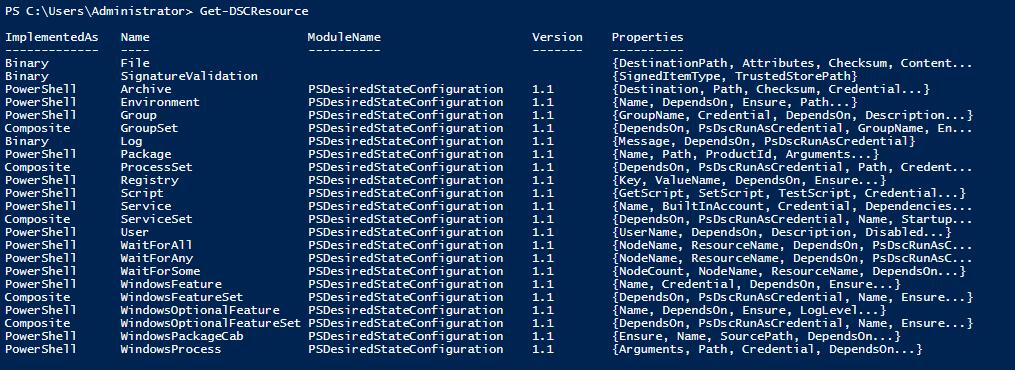
It will return the following resources that we can modify to configure our network nodes and servers. The list is great, but we will install the PowerShell DSC Resource Kit which will massively extend our DSC capabilities.
Find-Module -Tag “DSCResourceKit”
This will list all of the modules that are part of the DSC Resource Kit. Remember we mentioned it before that there are “x” and “c” prefixes on the DSC Resources.
X = Experimental
C = Commity
To install one of these modules, we can run the following command like the one below:
Install-Module -Name “xDhcpServer”:

Now when you run “Get-DSCResource”, you will see the resources included with the “xDhcpServer” DSC resource:
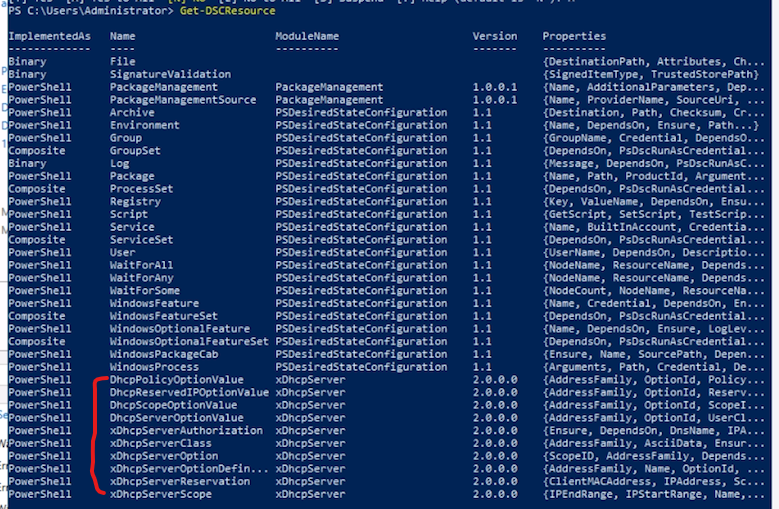
Additionally you can install modules from the PowershellGallery.com by downloading and then placing them in your PowerShell Modules folder.
No comments yet. Add the first comment to start the discussion.