
Move all AD Users in a Group to a Specific Organizational Unit
In this lecture, we are going to be learning how to move the Active Directory members of a particular group to a specific Organizational Unit.
Now, in our case and what we are going to demo here, we are only moving three Active Directory Users, so it might be just a little easier to just do it by hand using the Graphical User Interface.
However, if you are working in a situation where you have one hundred user accounts that are part of a specific group and you need to move them to another OU, and you don’t know exactly where all the user accounts are located it’s much more efficient to use PowerShell to do this.
So, let’s go ahead and get started by looking at what we are going to be doing.
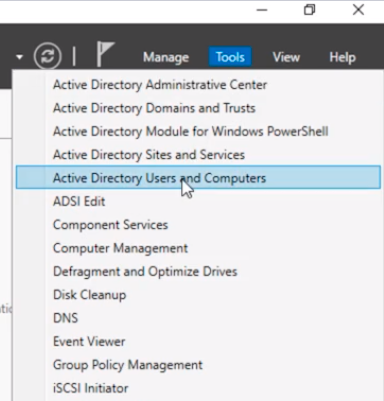
In this case, I am on my server here IPDC01 and what I am going to do is click on Tools from Server Manager and launch Active Directory Users and Computers.
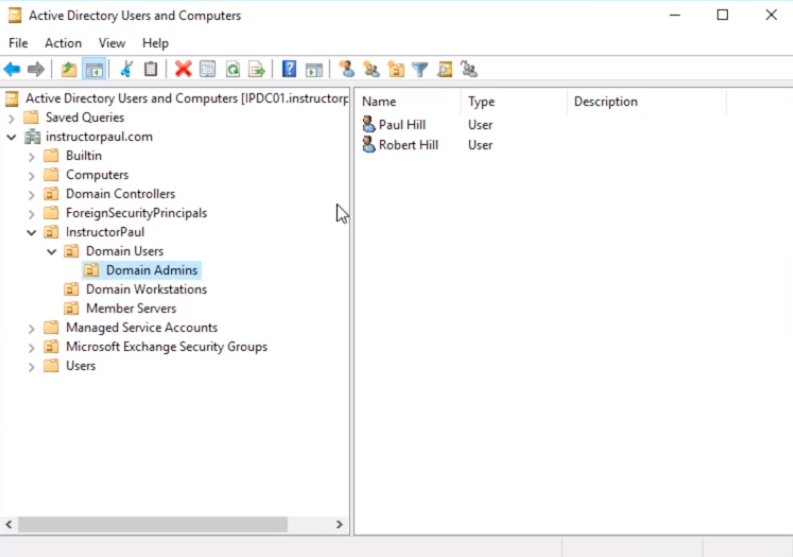
I have this structure set up where I have an Organizational Unit called InstructorPaul, and inside this, I have Domain Users, Domain Workstations, and Member Servers.
Now, if I expand Domain Users OU I have another OU called Domain Admins. Here is Paul Hill and Robert Hill. These two are members of the Domain Administrators group.
However, if I go under the Users container, and I double-click on Administrator.

And, I click on the Member Of tab.
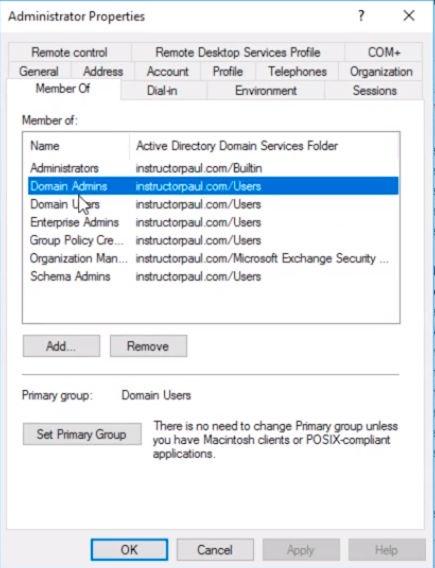
I can see that this user is also a member of the Domains Admins group.
So, in this particular scenario what I want to do is I want to move all the Domain Admins to the Domain Admins Organizational Unit.
Now, if you don’t have…
No comments yet. Add the first comment to start the discussion.