
Troubleshooting Tools Every IT Pro Must Know
**In this Video: **
- We will demonstrate the troubleshooting tools that every IT Pro must master in order to be successful.
- At the completion of this lecture you will gain valuable-work related knowledge and experience by utilizing and implementing the tools discussed in this lecture.
**What is a baseline? **
- In the simplest terms, a network performance baseline is a set of metrics used in network performance monitoring to define the normal working conditions of an enterprise network infrastructure.
- Engineers use network performance baselines for comparison to catch changes in traffic that could indicate a problem. Several of the following tools will assist you in creating a baseline for your network. I recommend that you create a baseline for your network by including screen shots and detailed explanations just like we will demonstrate in this lecture.
**ping **
- Provides a basic connectivity test between the requesting host and the destination host. Ping uses the ICMP protocol to send out an echo request. The destination host sends back an echo response.
- Type ping svr-us.uss.com
Under ping statistics, we sent out 4 packets and the destination sends back 4 packets.
We sent out 32 bytes of data and we received the data back in 1 ms with no lost packets.
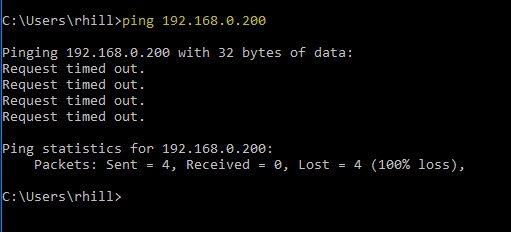
If you receive a response, from a computer such as this you will know that this device is no longer on the network. **We sent out four packets and lost all four. **
**tracert **
- Tracert, displays the step-by-step route a packet takes to the destination that you specify. The term hops refers to the number of routers.** **
My router starts the route at 192.168.1.1 and ends at hop #11, IP address 172.217.5.238.
- How can this information be used? This tracert output…
No comments yet. Add the first comment to start the discussion.