
Stub Zone Creation
**In this Video: **
- We will describe Stub Zones
- We will consider the differences between a conditional forwarder, a delegation and a stub zone.
- We will describe a scenario in which stub zones could be used in your organization.
- At the completion of this lecture, you will know how to use stub zones in your lab or your organization.
What is a Stub Zone? How are stub zones different from conditional forwarders or delegations?
Describe a Stub Zone
- A stub zone is a pointer, that points to another DNS server (we will call this server the target server).
- A stub zone is unique in that it can dynamically update itself.
- If things change (at the target domain) if DNS servers are added removed. Stub Zones know about those changes where delegations or conditional forwarders would have to be manually changed.
- A stub zone is a forward lookup zone. A stub zone only requires the SOA and the NS records from the other DNS server (or the target), which are normally publicly available.
- Stub zones are useful in that they are dynamically configured and basically can take care of themselves.
Describe Conditional Forwarders and Delegations
- Delegations and conditional forwarder are configured to point to other servers as well.
- When a conditional forwarder or a delegation is configured, a single server is used to resolve names. If that server (the target) goes down the clients won’t be able to get to the data that they require.
- Delegations and conditional forwarders are useful if there are no future changes made at the target domain.
**LAB Prerequisites: **
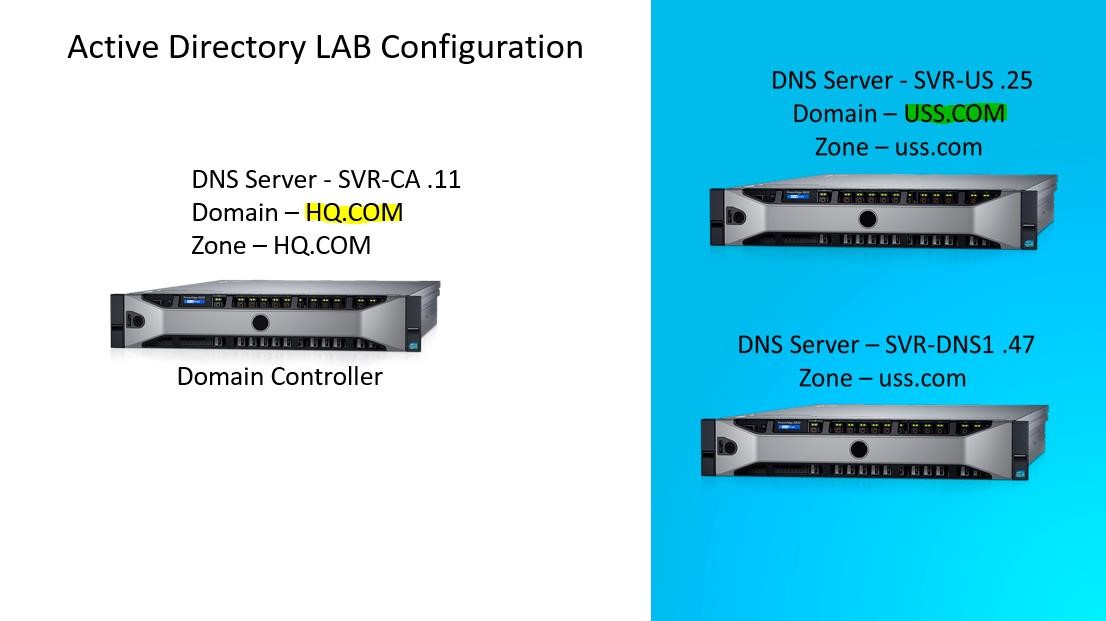
- Setup Three Windows 2016 Servers
- Two of those servers should be “stand alone” domains (completely separated) I used hq.com and uss.com.
- For the domain uss.com install Active Directory on SVR-US, On SVR-DNS1 install DNS.…
No comments yet. Add the first comment to start the discussion.