
Configuring DNS Settings for Active Directory Trusts
In this lecture we are going to configure DNS settings for both ad.serveracademy.com and co.serveracademy.com so each domain can resolve the other domain name. This is a requirement if you’re trying to establish a domain trust between two domains.
Our domain consists of the following servers all on the same network:
SADC01.ad.serveracademy.com - 10.1.0.10/8
CODC01.co.serveracademy.com - 10.2.0.10/8
Test DNS name resolution
First, we can test the DNS name resolution from each domain, by running the nslookup command in each domain. On ad.serveracademy.com domain, I will run:
nslookup co.serveracademy.com
Which returns the following error:
*** localhost can’t find co.serveracademy.com: Non-existent domain
And on co.serveracademy.com domain, I will run:
nslookup ad.serveracademy.com
Which also returns:
*** localhost can’t find co.serveracademy.com: Non-existent domain
These errors will prevent us from establishing a domain trust because we can’t find the domain we want to establish a trust with. To fix this, we need to create a DNS stub zone in each domain that points to the other domain.
Create a DNS stub zone
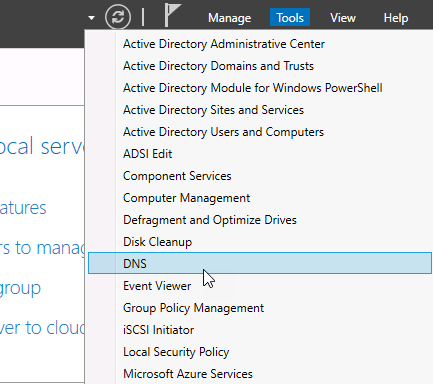
On the domain controller for co.serveracademy.com, open Server Manager then select Tools > DNS:
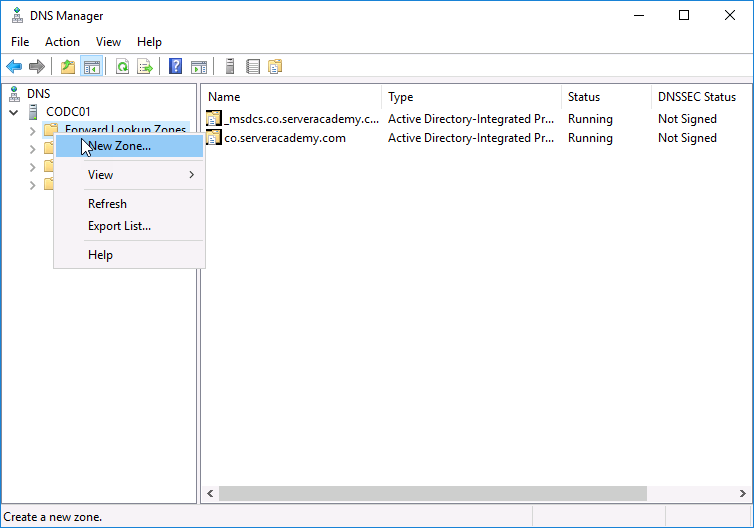
Next, left-click the server CODC01 to expand it. Now right-click on Forward Lookup Zones and select New Zone…
Click next until you reach the Zone Type page. Select Stub Zone and click Next:
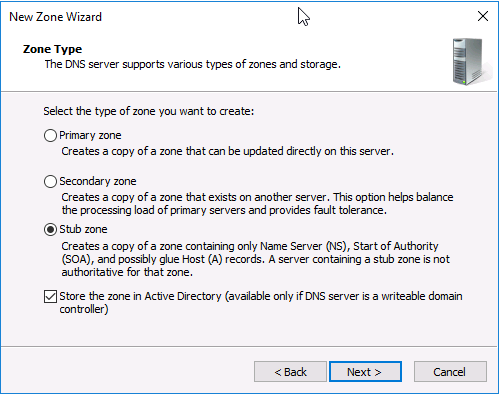
We want this stub zone to be replicated for all domain controllers in our domain, so proceed with the default selection on the next page and click Next:
No comments yet. Add the first comment to start the discussion.