
The AWS Pricing Calculator
The AWS Pricing Calculator is a tool provided by Amazon Web Services (AWS) that allows users to estimate the cost of using various AWS services. The calculator allows users to select the services they are interested in using, specify the usage and resource requirements for those services, and then receive an estimate of the costs associated with those services.
In this lesson, you are going to create a cost estimate for an AWS EC2 instance. Go ahead and navigate to the URL below:
https://calculator.aws/#/addService/ec2-enhancement
EC2 (Elastic Cloud Compute) Cost Estimate
Type a description for your estimate and choose your desired region. The details of the instance are as follows:
- Tenancy : Shared Instances
- Operating system : Linux
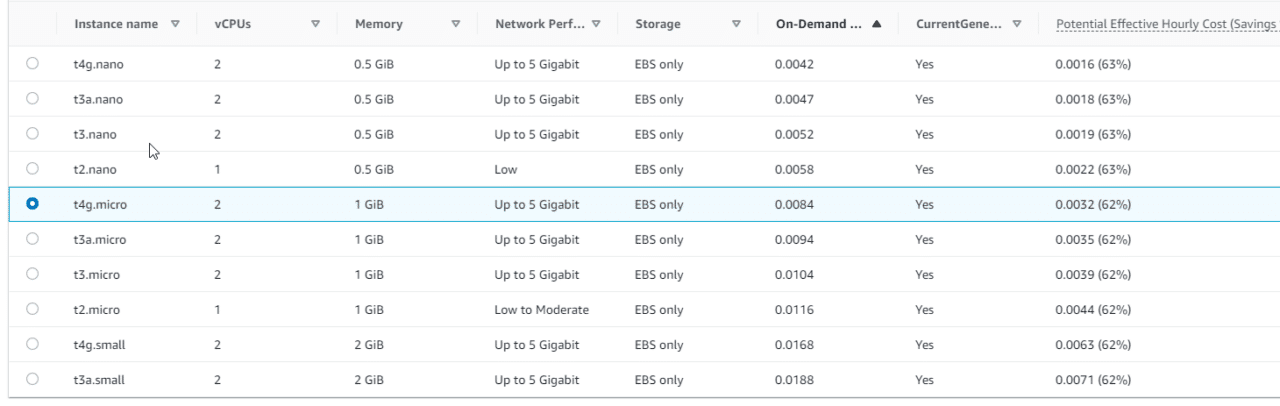
- Memory : 1 GiB
- vCPUs : 2
- Network Performance : Up to 5 Gigabit
EC2 Tenancy This determines if the VM is run on a dedicated host or a shared host server. I definitely do not need a dedicated physical host for a lab project so I will chose shared
What is Tenancy?
I am choosing a t4g.micro instance to fit these needs which clocks in at around $0.0084 per hour:
 AWS EC2 Instance Types
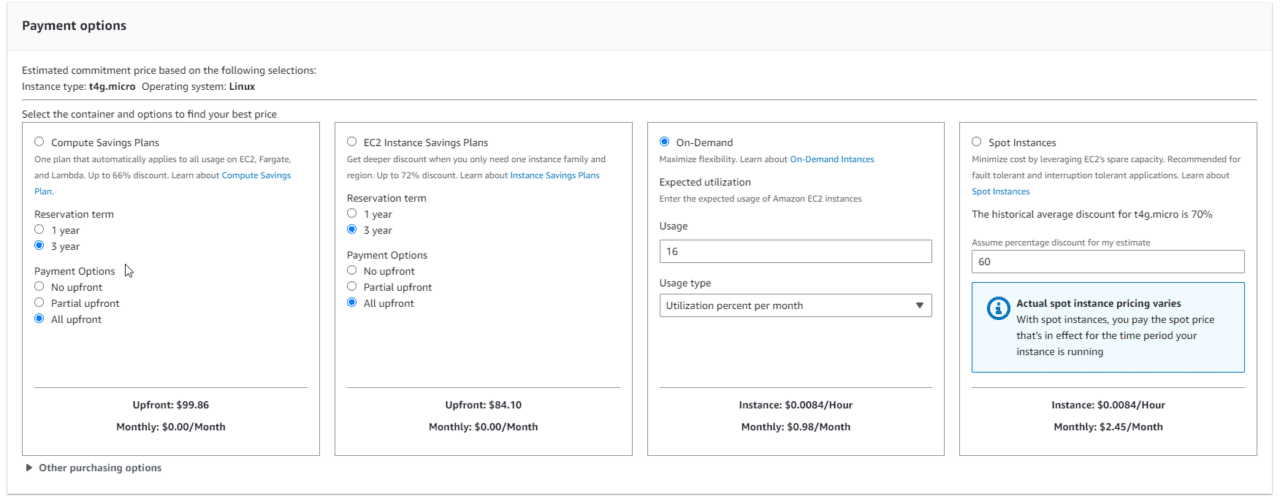
Next, we need to choose our payment options. You can save money with the Compute Savings Plans by paying up front and committing to a longer period of time. Since this would be a lab project, we don't know if we want to keep or not, let's just choose On-Demand.
I plan to use this VM on the weekends to learn Linux. I expect 4 hours between Saturday and Sunday max, so I will enter that under the usage input box.
 AWS EC2 Payment Options
So far my bill is a whopping $0.98 per month, but we still need to calculate EBS (basically the VMs hard disk)…
No comments yet. Add the first comment to start the discussion.