
Setting up a Logon Banner (Interactive Logon)
In this lecture, I am going to be showing you how to set up an Interactive Logon. Now, this is something that you are going to set up for a company when they want to display a work policy or a warning policy before a user logs in to a computer.
An Interactive Logon is when you access your computer and a message is displayed. For example in Government, you may get a policy that states you are accessing a governmental system. In a private company you might see unauthorized access to a computer might be prosecuted.
Now, to set up a Logon Banner follow these steps:
- Open Server Manager > Tools > then we go over to Group Policy Management.
- This is a Computer Configuration setting. Head over to your OU if you have created one, if not you can make a new one. Right-click on instructorpaul.com and select Create a GPO in this domain and link it here... We will call it Interactive Logon and click OK.
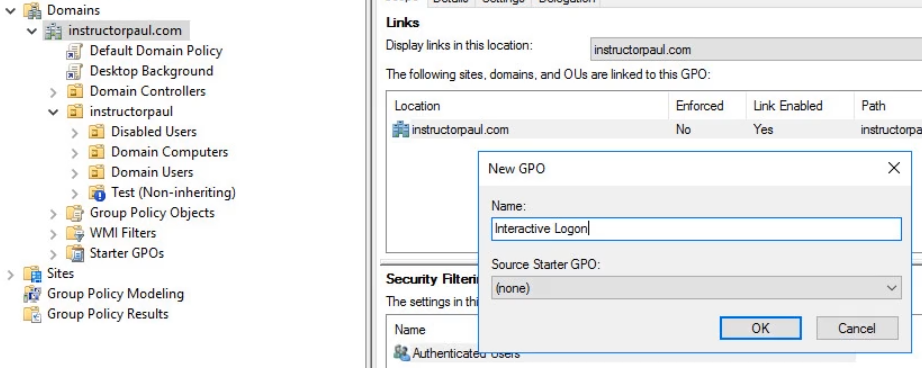
- Now let's edit the Policy by right-clicking it and choosing Edit.
- Navigate to Policies > Windows Settings > Security Settings > Local Policies > Security Options.
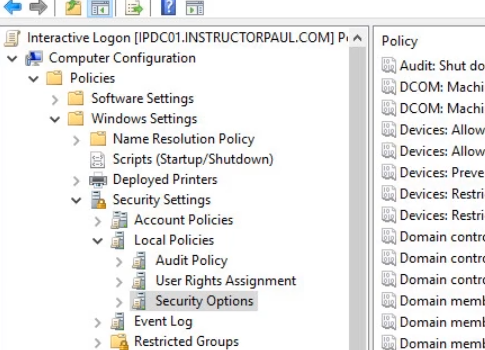
- Now we want to look for Interactive Logon and we select the Message Title one.

- Let's double click to open > click on Define This Policy > Now enter your text (Note this is your TITLE).
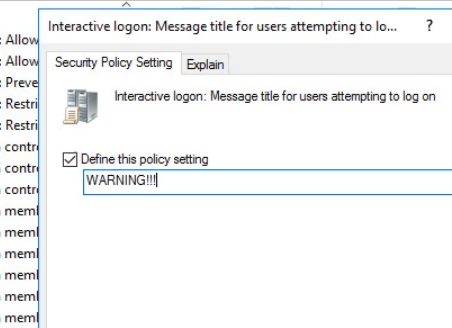
- Now we configure the sec…
No comments yet. Add the first comment to start the discussion.