
Creating and Managing GPOs
In this lecture, you are going to learn how to create and manage Group Policy Objects commonly referred to as GPOs.
Now, GPOs contain settings and configurations that can be applied to users or computers that are stored within Active Directory. A Domain can contain several GPOs and you will almost never see a Domain that contains one GPO. It's also important to know that one individual GPO can be linked or applied to multiple OUs simultaneously.
GPOs are often used in a modular sense, meaning that the administrator might create several GPOs or one GPO and apply them to multiple OUs as needed.
Creating a GPO is very similar to creating a user account within Active Directory. All you need to do is right-click on Group Policy Objects and choose New.
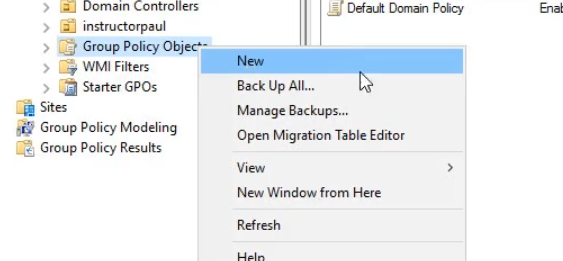
Additionally, you can right-click on your Domain or an Organizational Unit and choose to Create a GPO in this domain, and Link it here...

The difference between these two methods is that the Domain/OU option makes a GPO and a Link. This means that the GPO will take effect wherever we create the link.
Let's create a GPO using both methods:
Domain Level GPO
- Right click the domain and choose to Create a GPO in this domain, and Link it here...

- A New GPO window will appear. Name it Test GPO:
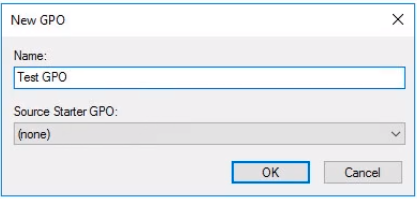
- No starter GPO set. That means that all settings inside the GPO will be not configured.
- Now we can see the link is created, and if we expand GPO objects, we can see our GPO.
![](https://zrftqtvkikjkbtkfalgp.supabase.co/storage/v1/object/public/lesson-images/62…
No comments yet. Add the first comment to start the discussion.