
Adding Roles to Our Playbook
In previous lessons we created the folder structure and files for our new common Ansible role. Now it's time to add that role to our playbook and execute the playbook.
Adding the role to our Ansible Playbook
To get started, you'll be modifying the playbook located at ~/first_playbook.yml. Open this playbook in a text editor:
nano ~/first_playbook.yml
Add the common role to this playbook and remove our previously defined tasks. The playbook should now look like this:
__
Notice that we set become to be yes (equivillent to true). This will require the sudo password for each node. We'll deal with that shortly.
Here, the playbook is configured to run on all hosts, and it includes the common role which we created in earlier lessons.
As always, make sure you run the ansible-playbook command from the home directory where we have been creating the role folders and files, where our inventory and ansible.cfg files are located as that is quite important.
Running the Playbook
Finally, execute the playbook to apply the common role to your servers. Run the following command:
ansible-playbook first_playbook.yml
This command will start the Ansible playbook, applying the common role across all specified hosts. When we execute this playbook, we will see an error output like so:
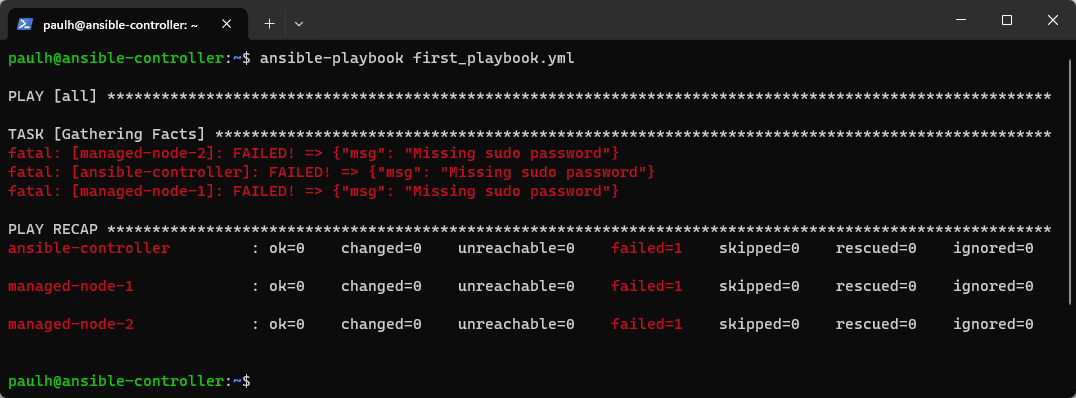 Ansible Playbook Error: Missing Sudo Password
This error occurs because we haven't defined our user password yet. You'll learn about how to securely store passwords with Ansible Vault and become password files later, for now, let's configure Ansible to simply prompt for the sudo / become password.
But first, how do we figure out if this is even possible? By reviewing the help files,…
No comments yet. Add the first comment to start the discussion.