
Creating and Deleting Organizational Units
In this lesson, I'll be showing you how to create Organizational Units.
Now, an Organizational Unit are these so-called folders that you see up here that contain Active Directory Objects.
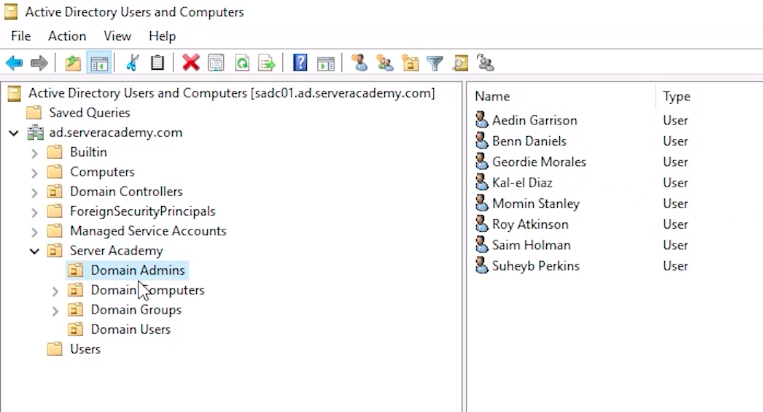 Active Directory Users and Computer Objects
Now, it gets kind of complicated because not all of these are OUs like Bultin, Computers, and ForeignSecurityPrincipals. These are not necessarily Organizational Units but rather Containers.
This gets into the out of the scope of this fundamentals course. We have all this detailed out in the Active Directory Course. If you are interested in that, please refer to the Active Directory in the Windows Server Course. We are getting into a lot more detail there, but just for now know that an OU has a different icon, so you can identify the OUs because you will see the icon slightly different here, This is an OU and these are rather Containers. Also, Organizational Units can receive Group Policy Objects directly attached to them.
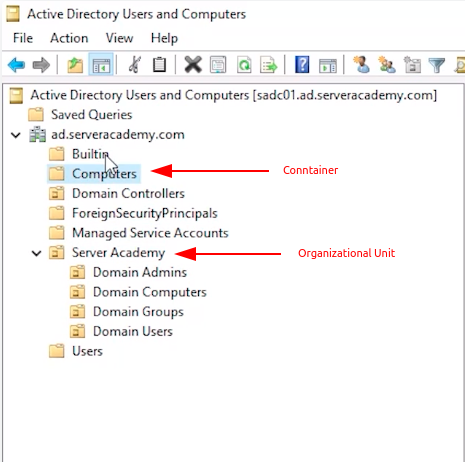 Active Directory Users and Computer OUs and Containers
Now, that probably went right over your head, again, it kind of goes beyond the scope of what I can explain just in this course. We do explain it inside of the Group Policy and the Active Directory courses.
Now, what I am going to do is create an Organizational Unit under Server Academy and I will just right-click the OU , and selectNew > Organizational Unit.
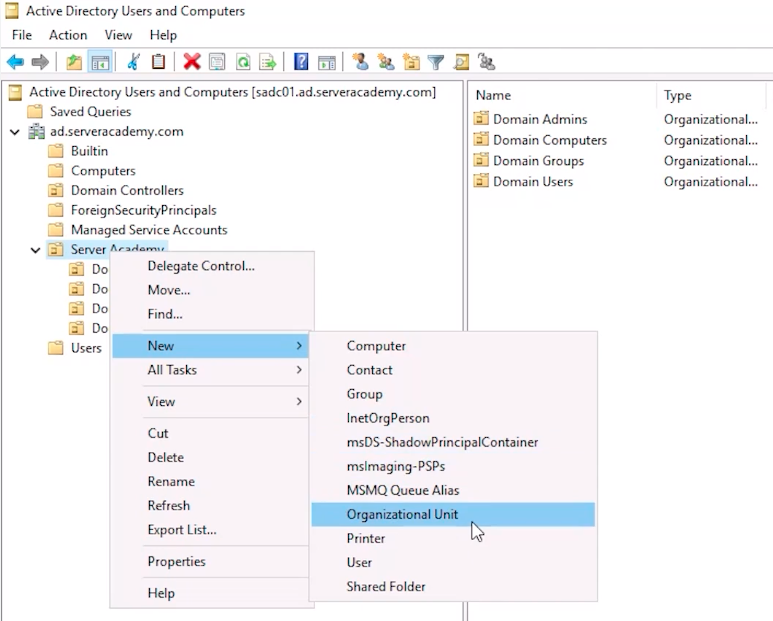 Active Directory Users and Computers - New OU
Now, we are going to call this: Disabled Users. And, we are going t…
No comments yet. Add the first comment to start the discussion.