
How the IT Labs Work
This lab is being rebuilt
We are replacing our previous lab platform with new browser-based IT labs. This lesson's hands-on environment is temporarily unavailable while we finish the migration.
Check back soon, or continue with the next lesson in your course if your instructor has pointed you there.
At Server Academy we believe the best way to learn is by doing... not just watching videos and listening to your instructor talk...
That's why most of the courses at Server Academy include at least one IT lab per section. This course (since it's free) includes a single IT lab at the end of the course where you can practice what you will learn.
Our IT labs do not require you to install any software but instead will launch in your web browser and will provide you with an RDP connection to REAL servers through HTML5:
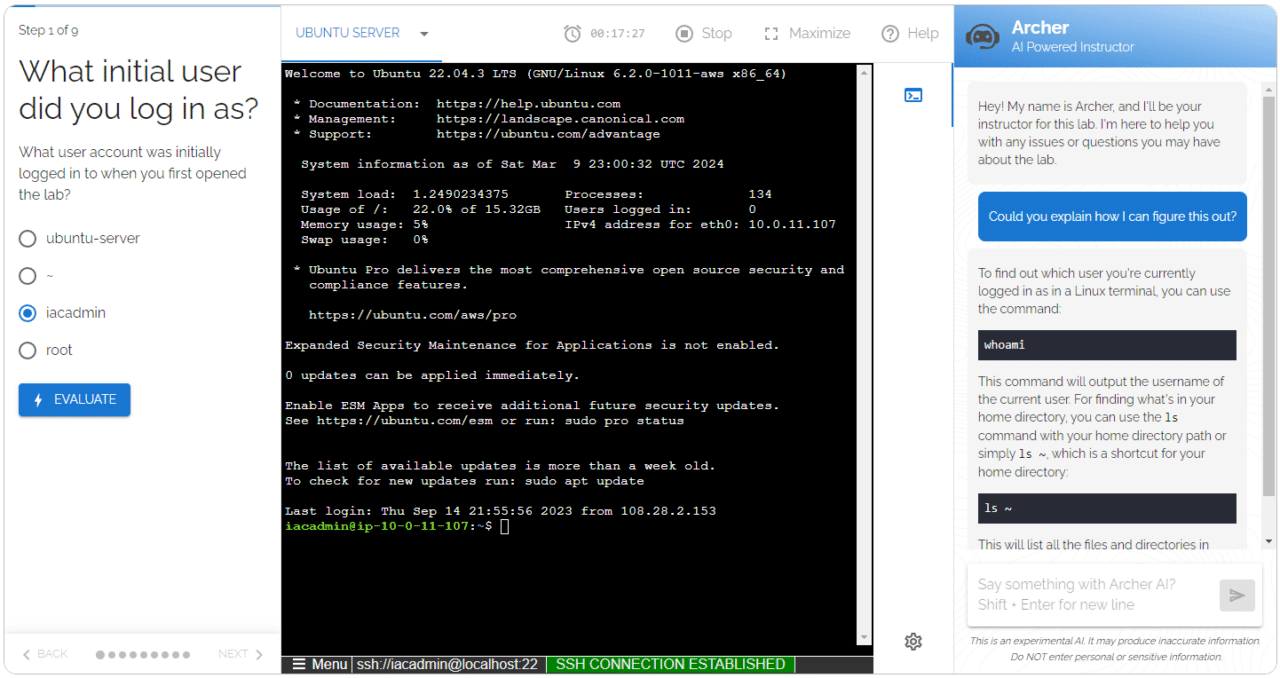 AI Powered IT Labs
The labs offer a few unique features that most other platforms do not:
- Step-by-step instructions : All of our Linux labs include a series of instructions you need to complete. Your work will be automatically evaluated and you will receive live feedback while you move through the lab.
- VSCode : an SSH terminal, and RDP/xRDP (when appropriate)
- Archer AI : Our AI instructor will help you with the lab if you get stuck. Archer can see inside your lab (he can see a configuration file you're trying to update for example) and will help you out when you run into trouble!
You are free to use the IT labs as MANY times as you want! You don't have to worry breaking something in the IT labs because the settings are reverted every time you close the lab.
This will save you countless hours of downloading and installing software, attempting to configure the exact scenario that our course is teaching you, and simply wasting time with misconfigurations.
Now that you know how the IT labs work, let's learn about Active Directory so you can get practicing on real servers in our IT labs!